Tuesday, 17 January 2017

Consumption Based Planning in SAP


In Consumption Based Planning, SAP uses the past consumption data to calculate the future requirements. There are three procedures within MRP:

1. Re-order point planning
2. Forecast based planning
3. Time phased planning


Re-order point planning

§  Procurement is triggered when the sum of plant stock and firmed receipts fall below the reorder point
§  The reorder point is calculated as the material demand during replenishment lead time
§  The Safety Stock (SS) takes care of both excess material consumption within the replenishment lead time and additional requirements that may occur due to supply delays.


Where:
z = service factor based on desired service level
L = average lead time
σD =standard deviation of demand
D = average demand
σL = standard deviation of lead time

We can use Manual Reorder Point or Automatic Reorder Point

§  Manual Reorder Point: The planner manually enters the reorder point and the safety stock in the individual material master record. It corresponds to the MRP type VB.

§  Automatic Reorder Point: The system calculates the reorder level and the safety stock level using past consumption data of the material to forecast future requirements. It corresponds to the MRP type VM.


 Forecast based planning: 

Forecast-based planning is also based on material consumption. Like reorder point planning, forecast-based planning operates using historical values and forecast values and future requirements are determined via the integrated forecasting program. However, in contrast to reorder point planning, these values then form the basis of the planning run. The forecast values therefore have a direct effect in MRP as forecast requirements.
The forecast, which calculates future requirements using historical data, is carried out at regular intervals. This offers the advantage that requirements, which are automatically determined, are continually adapted to suit current consumption needs. The forecast requirement is reduced by the material withdrawal so that the forecast requirement quantity that has already been produced is not included in the planning run again.

§  It is also based on historical data -the past material consumption data- and future requirements are determined by the forecasting program
§  Here the forecast values are used in MRP as the forecast requirements
§  Based on the consumption pattern the system changes the forecast requirements for future
§  MRP type needs to be entered as VV

Time phased planning:

§  In this MRP procedure, the date of the planned requirement should coincide with a known date, such as the date when the supplier delivers
§  Requires that the material forecasting be completed for the material
§  MRP type needs to be entered as R1
§  This is used specially in case if the planning cycle is known.
§  The materials planned using this is given an MRP date in the planning file.
§  This date is set when creating the material

Wednesday, 11 January 2017

Make to Order(MTS) & Make to Stock(MTS) scenario in SAP.


Made-to-stock Scenario:


If a material is defined as a made-to-stock material, i.e., materials which are not marked with any strategy types or strategy groups in the SAP material master MRP 3 view or materials which are marked with collective requirements in the MRP 4 screen, the system calculates the material requirements through the use of a pretty simple algorithm; where it takes into account the stock in the storage locations, the receipts expected for the materials through purchase or production and the incoming demands.
In a made-to-stock scenario, the incoming customer requests are fulfilled from the inventory. The made-to-stock products are normally the consumer products or products which have a monopoly market and are sold out of the existing inventory. Such products are developed and produced continuously over the years till the product comes to the end of its life cycle.
In such scenarios, the shop floor or the production team never knows, for whom the product is being produced. The customer demands and the market situations can only be forecasted and used as a basis for future production. In SAP the forecasted quantity is evidently used in a form of planned-independent-requirement.
Made-to-stock production quantities are entered in SAP through the use of “Planned independent requirements” (transaction code MD61) which are subsequently planned by SAP MRP run. The planned independent requirements can be entered manually or the requirement can be pulled in from forecast or it can be pulled in from the sales and operation information structures (information structures which carry the sales information at levels defined by the organization).


Made-to-order Scenario:


In cases where the material is defined as made-to-order, i.e., materials which are marked with a made-to-order strategy in the MRP 3 view of the SAP material master and marked with individual requirements in MRP 4 view, the system calculates the material requirements through the use of an algorithm which takes in to consideration the receipts expected for the material through purchase or production and the incoming sales order demands. Here the system does not take into account the storage location stock of the material (since the stock in the storage location for the material is always tagged for a customer order and cannot be used anywhere else).
In a made-to-stock scenario, the incoming customer requests are accepted and produced thereafter and ultimately delivered to the very customer. The example of such a scenario can be high end products like jewelry or high end equipment’s or very costly product. These products are normally configured by the customer and the order is produced according to the customer requirements or by the design provided by the customer. The Sales order is created or configured according to the customer requirements and passed on to the production team.
In such a scenario, the tracking of the sales order from its creation to planning to production to inventorying to delivery can be easily tracked unlike in made-to-stock scenarios, where the incoming sales orders are not tracked in the plant, but are fulfilled by the existing stocks.


Made to Order vs. Made to Stock Production


Process in a Sequence
Made to Order
Made to Stock
Definition
When you specially produce and deliver a product for a customer's order, it is called "Made to order" Production. For example Production of Designer Jewelry, Production of Areoplanes, production of Special type of steel, High end instruments and vehicles etc.,
When you produce according to a periodic forecasted demand and sell the product to any incoming customer who wants to buy them, it is called "Made to Stock" Production. Example Mass Steel Production,
Demand Form
Customer Places a Sales order. A Sales order for the demand is created in SAP.

Sales order in some cases is referenced from a previous enquiry or quotation of sales created.
When you produce against a Periodic forecasted demand it is called Made to stock production. 

You can enter this forecasted demand in a tool in SAP called Planned independent requirements in the system.

Planned independent requirements can also be derived/copied from Sales & Operation Planning system which contains demand from previous periodic Sales figures from the sales areas or Sales organizations or sales area or sales offices or plants or various combination of this (as per your requirements). These previous period figure for a product or a product group can be extrapolated to create the demand for the future periods.   

SAP Production Strategy
Every Material that is ordered should have a strategy that is - Made to order Strategy = 20, set in the Material Master MRP 3 View, Strategy Group Field.

Strategy 20 is used for Made to order scenario, in which case the production is tagged with the customer order.

You should also set the Individual and collective Indicator in MRP 4 to = "1" - Individual requirement which specifies that this is an individual requirement not to be clubbed and produced individually for a given customer order.
Every Material that is Produced with a forecasted demand should have a strategy that is - Made to stock Strategy = 10, set in the Material Master MRP 3 View, Strategy Group Field.

Strategy 10 is used for Made to stock scenario, in which case the production is not tagged with the customer order.

You should also set the Individual and collective Indicator in MRP 4 to = "2" - Collective requirement or a field value which "Blank" - Individual and collective.
Transfer of Demand to MRP
Demand is Pushed to SAP MRP Tool
Periodic demand is pushed to SAP MRP Tool
MRP Net Requirement Planning for the header Materials
MRP For its planning calculates the Net requirement planning

MRP analyses and evaluates the Customer Demand for the Ordered Material and while doing this it does not check for availability of the Materials in stock and considers it as not available at the time of creating procurement proposals in MRP.

MRP Creates a Planned order for the total quantity of the customer order.
MRP Evaluates the Planned Periodic Demand for the Material and while doing this it checks for availability of the Materials in stock and computes the shortage quantities.

MRP creates a Planned order for the shortage quantities of this periodic demand.

To get the Shortage Quantities - The system thereby compares available warehouse stock or the scheduled receipts from Purchasing and Production with planned independent requirements, material reservations and incoming sales orders. In the case of a material shortage, that is, if the available stock (including firmed receipts) is smaller than the quantity required, the system creates procurement proposals.
Goods Receipt from the Production order
The Products which are fully manufactured against the order are received to the "Finished Goods Storage Location" through a SAP Material Movement called "Goods receipt against the Production order - Movement type 101".

The Received Materials in a MTO scenario have a tag of the customer order and customer against them and they cannot be issued or delivered to any other customer order.
The Products which are fully manufactured against the order are received to the "Finished Goods Storage Location" through a SAP Material Movement called "Goods receipt against the Production order - Movement type 101".
Order Settlement
Orders which are received in to stock are settled by the finance team.


Featured post

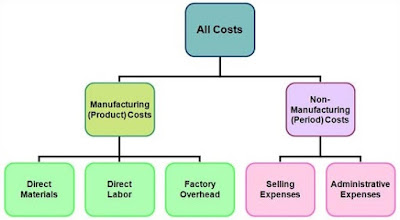
Introduction to manufacturing and non-manufacturing costs!!

A manufacturing company incurs both manufacturing costs (also called product costs) and non-manufacturing costs or expenses (also called ...